
Summary
The purpose of this document is to help our publishers get started sending people into Research For Good's survey offers, and be able to track in real time their conversions.
RFG Offer URLs
Each of our offer URLs are in the following format: 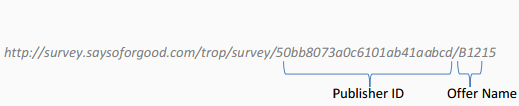
Each publisher will be given a Publisher ID, which will never change. We have multiple offers available for each publisher and each one has a name (or code). In the example above, the offer is "B1215".
Following the URL, you may append any HTTP parameters you wish to send us additional information. The names of the parameters are entirely up to you. Whatever parameters you send us, we will store. We will include these parameters in the callback URLs so you can track precisely which people completed surveys.
For example, you might redirect a respondent with your ID of '123456' to
http://survey.saysoforgood.com/trop/survey/50bb8073a0c6101ab41aabcd/B?custom_id=123456
The following HTTP parameters are all optional, but if provided, we can use them to improve the user experience:
| Name | Description |
|---|---|
| rid | A value which uniquely identifies the user. When this respondent returns to us on multiple offers, the rid should remain the same. This allows us to re-use information already gathered from this respondent. |
| gender | The gender of the respondent. Valid responses for male are '1' or 'm'. Valid responses for female are '2' or 'f'. |
| zip | The postal code of the respondent. For US, provide 5 digits only. For Canada or UK, please provide 6 digits. |
| birthdate | The date of birth in format: 'MM-dd-yyyy' |
| aid | A value which uniquely identifies your affiliates |
| aid2 | A value which uniquely identifies your affiliate's sub-affiliates |
Callback Parameters
You can add any of the following placeholders to your callbacks to get more detailed information back from us:
| Placeholder | Description |
|---|---|
| {payout} | Payout |
| {payoutCents} | Payout in cents |
| {sesskey} | Unique Session Identifier |
| {timestamp} | Timestamp |
| {panelist.[PROPERTY]} where [PROPERTY] can be: "age", "rid", "birthdate", "gender", "country", "zip", "city", "stateText", "countyText", "language", "maritalStatus", "howManyChildren" | Profile information about the panelist |
| {start.[PROPERTY]} where [PROPERTY] can be: "fingerprint", "remoteAddr", "ruledOutBy", "computerCheck", "isTablet", "isMobileDevice" | Additional start information |
| {start.result} | Gives further detail about the result of the start. 0. No result (session in progress or drop-out) 1. Complete 2. Terminate 3. Over-quota 4. Reserved 5. Survey Closed (watch this result to close surveys) 6. Security 7. Early Terminate (During prescreening, we determined the panelist did not qualify for the survey) 8. Duplicate (We determined the panelist had already attempted the survey) 9. Early Quota (During prescreening, we determined the panelist did not fulfill quotas) 10. Customer Security (We redirected the panelist to the survey, there was a security risk found) 11. No Surveys Found 12. All Surveys Attempted 13. Max Tries Reached |
| {params.[PROPERTY]} where [PROPERTY] is a value you have sent to us. | Values that you have sent us. |
Complete Tracking
We provide three different ways for you to track your completes (conversions) in real time.
1. Page Redirect with HMAC_MD5 security
This method allows you to specify a web page URL that the respondent will be redirected to, following the completion a survey. Optionally, you may also specify URLs for non-complete attempts.
All of the parameters you included in the offer URL will be sent back to you in the complete URL.
For example, suppose you provide us a complete URL of http://my.server.com/mypage.jsp
If you redirected your respondent to
http://survey.saysoforgood.com/trop/survey/50bb8073a0c6101ab41aabcd/B?custom_id=123456
Then following a complete, we will redirect the respondent to
http://my.server.com/mypage.jsp?custom_id=123456&security=28e08e74bd1725796137cd837b0c87c2
We will append an HMAC-MD5 hash of the complete query string, secured via a pre-shared key. This prevents a respondent from attempting to forge the complete URL and obtain a reward without completing a survey.
For example, if our pre-shared key is "123498ejoasdfas234890asdlkq23490ika", then the following javascript may be used to compute the security hash:
<script src="http://crypto-js.googlecode.com/svn/tags/3.1.2/build/rollups/hmac-md5.js"></script>
<script>
var hash = CryptoJS.HmacMD5("custom_id=123456", "123498ejoasdfas234890asdlkq23490ika");
</script>
Details of the javascript library used above may be found at https://code.google.com/p/crypto-js/ , however the HMAC-MD5 is a standard algorithm available in any language and usually from multiple sources.
You must verify the hash before rewarding your respondent. Without this security, it is extremely easy for a respondent to attempt to forge the complete URL.
If you choose this method, we must pre-arrange the pre-shared key and security parameter name
2. Client Side callback ("Pixel Fire") with HMAC_MD5 security
This method allows you to specify a web callback URL that will be asynchronously called from the respondent's web browser following the completion of a survey. You may track this either via HTTP parameters, or via a cookie previously left on the user's computer. In either case, you must verify the HMAC_MD5 hash before rewarding your respondent. Without this security, it is extremely easy for a respondent to attempt to forge the complete URL.
All of the parameters you included in the offer URL will be sent back to you in the complete URL.
For example, suppose you provide us a complete URL of http://my.server.com/mypixel.jsp
If you redirected your respondent to
http://survey.saysoforgood.com/trop/survey/50bb8073a0c6101ab41aabcd/B?custom_id=123456
Then following a complete, we will fire the callback using the following URL:
http://my.server.com/mypixel.jsp?custom_id=123456&security=28e08e74bd1725796137cd837b0c87c2
We will append an HMAC-MD5 hash of the complete query string, secured via a pre-shared key. This prevents a respondent from attempting to forge the complete URL and obtain a reward without completing a survey.
For example, if our pre-shared key is "123498ejoasdfas234890asdlkq23490ika", then the following javascript may be used to compute the security hash:
<script src="http://crypto-js.googlecode.com/svn/tags/3.1.2/build/rollups/hmac-md5.js"></script>
<script>
var hash = CryptoJS.HmacMD5("custom_id=123456", "123498ejoasdfas234890asdlkq23490ika");
</script>
Details of the javascript library used above may found at https://code.google.com/p/crypto-js/ , however the HMAC-MD5 is a standard algorithm available in any language and usually from multiple sources.
3. Server Side callback with IP address filter
As an alternative to the HMAC-MD5 security of the first two methods, we can invoke your callback URL directly from our servers. The callback URL must contain an identifier to allow you to know which respondent has completed the offer (as it will not contain any cookie information).
You must check the IP address that the callback comes from, and only reward your respondent if the IP address is on the list of our servers. Without this security, it is extremely easy for a respondent to attempt to forge the complete URL.
You should verify the following static IP addresses and only accept conversions that are sent from those:
15.222.163.99
3.97.223.177
3.97.28.227
3.230.105.121
52.21.20.32
52.45.41.61